

Embedding Digital Literacy Into ESL Writing Classes
Talley Caruso, Chabot College, Hayward, USA
Take Your Phones Out, Class!
In a time when most teachers are asking students to put away their phones, I am asking mine to use them. Why? In adult education, it has become increasingly important to create tech-relevant lessons to boost learner confidence and relevance using tools they already have. Many of our learners have jobs and act as caretakers for family members, so integrating digital skills-building in the ESL classroom allows them to maximize their time. Teaching them on their own phones also eliminates the need to manage additional campus technology (and its associated costs), while expanding opportunities to practice on a device students use daily.
I teach adult ESL in a Northern California county where the foreign-born population makes up around 34% of the total (U.S. Census Bureau, n.d.). My students come from many different countries, and a large portion are refugees from Afghanistan. While technology plays an important role in the initial refugee resettlement process, adult newcomers often express anxiety when using digital tools for academic purposes. In these spaces, the challenge of intertwined digital and language literacies is compounded by inadequate technical support (Dahya et al., 2023; Harris, 2015). However, in my years of teaching post-pandemic, I have found that every student has a smartphone. It is common to see students in the hallway, regardless of age, huddling over screens to watch video clips or exchanging voice notes with loved ones before class. This ubiquity provides the perfect entry point to channel casual smartphone habits into meaningful academic writing development.
"Click the Button at the Top": Navigating the Mobile-Desktop Disconnect
Ever scan a QR code at a conference only to realize the mobile site looks totally different from the presenter's projector screen? That disconnect is exactly where digital mishaps and misunderstandings occur. When we bring that friction into the ESL classroom, the confusion multiplies. To build our students' technological confidence, we need absolute alignment. Displaying information in a format that mirrors their actual smartphone screens keeps everyone on the same page and removes a massive barrier to learning.
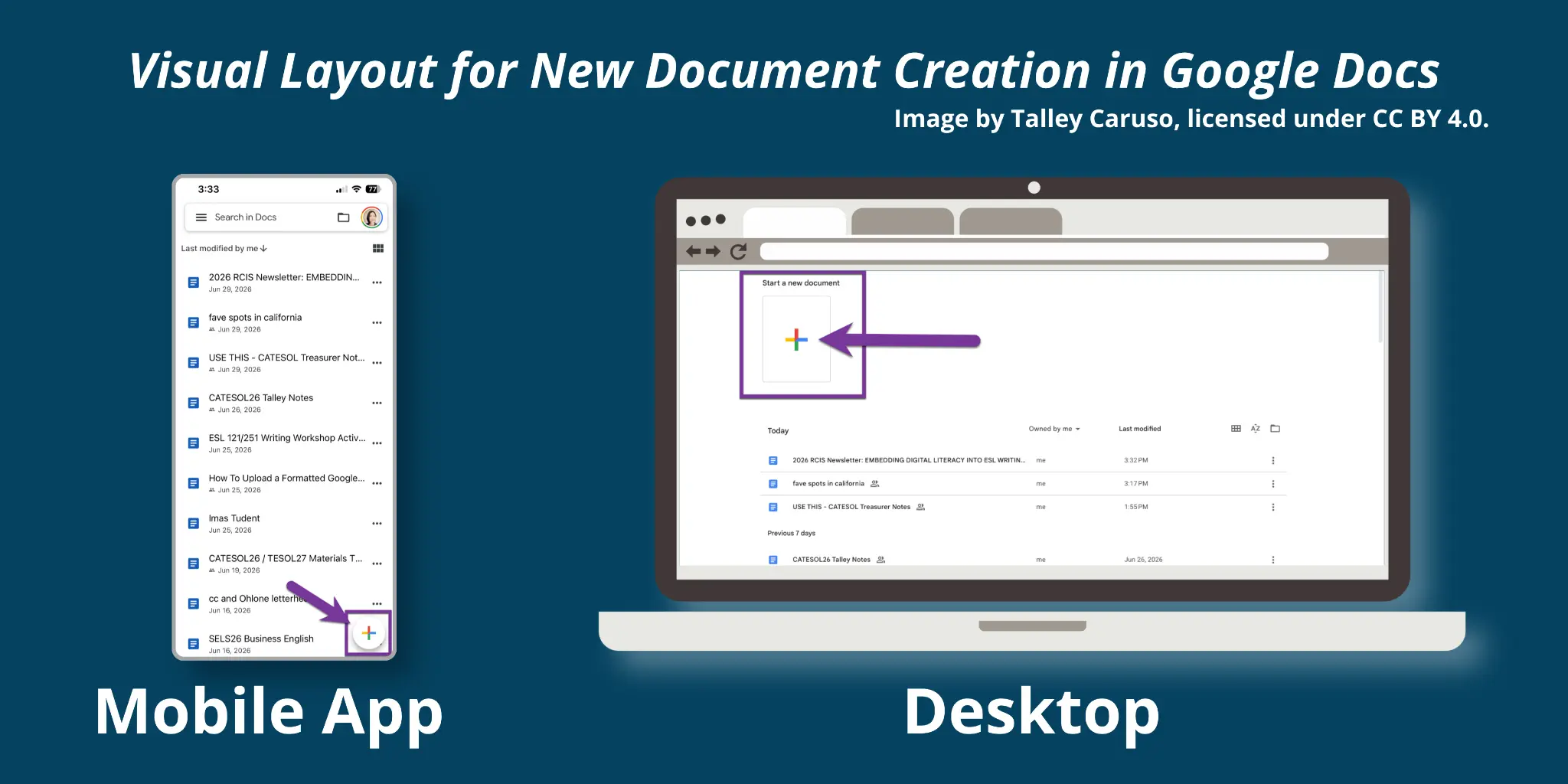
Photo caption: Figure 1. Visual layout for new document creation in Google Docs: mobile app vs. desktop.
From Pen and Paper to Smartphones (and Computers!)
For many of my community college ESL students, their smartphones are the only gateway to the digital world. This situation isn't unique. According to the Pew Research Center (2025), 34% of low-income households in the United States rely entirely on smartphones to get online. With limited home access to laptops or high-speed internet, our students don't have organic opportunities to experiment and practice extended writing activities on traditional technology, such as word processing apps and full-sized keyboards. Given how deeply digital and language literacies are intertwined, we must scaffold our students’ computer literacy alongside academic writing.
From day one, I coach my high-beginning writers to format their names and dates according to MLA standards on every worksheet I hand out. As a descriptive linguist, I frame this not as a set of arbitrary rules, but as the standard convention for U.S. higher education. Providing these consistent models normalizes the production of professionally looking work from the start. By contrasting a polished MLA-styled model with the raw, patchwork nature of their initial drafts, students can visually map the transformation they are embarking upon. Setting expectations for academic grammar, content, and format simultaneously provides a structured environment that formalizes my high, yet entirely attainable, standards for every student.
Every week, students draft a new paper or rewrite an existing one based on my proofreading feedback. By the second or third paper, they’ve caught the rhythm of multiple-draft writing. This is when we transition from pen and paper to smartphones—and eventually, computers.
|
Draft 1: Handwritten Foundation |
Draft 2: Handwritten Revisions |
Draft 3: Digital Migration |
Draft 4: Final Digital Edits |
|
|---|---|---|---|---|
|
Model |
Paper model of an MLA-formatted paragraph. |
Proofreading guide and vocal review of an example paper that has been proofread. |
"How-to" guide; step-by-step demonstration of typing/ formatting process. |
Review of digital feedback tools and mobile vs. desktop editing. |
|
Student Action |
Write first draft by hand following MLA layout conventions. |
Rewrite draft on paper based on teacher's grammar and content feedback. |
Type the revised paragraph into Google Docs using a smartphone. |
Apply digital formatting edits based on online teacher feedback. |
|
Submission |
Physical paper |
Physical paper |
Digital (mobile) |
Digital (final) |
|
Teacher Feedback |
Handwritten notes on grammar and formatting. |
Check mark to proceed to digital draft; individual review if needed. |
Digital comments in Google Docs focused on formatting. |
Closing comments and final digital grade/check in Canvas. |
Table 1. The four-stage writing process: Progression from handwritten drafting to digital revision
The approach: First, be patient with yourself
The entire process relies on patience and resilience, particularly on the instructor's part. It cannot be overstated how, as Harris (2015) points out, "with digital literacy, everyone is a learner." Technologies update, system interfaces change, and students will inevitably have phone layouts than their instructors. That is OK!
In this approach, we should think of ourselves as facilitators of learning. While the execution in the classroom may differ day-to-day, what is vital to the model is resilience. Our students are here to learn how to write in English; navigating the technology to do so should not be an additional stressor. An instructor's attitude has the power to shape the mood of the entire room, so allow it to be a fun and experimental space.
Reflection and implications for practice
By extending our students' smartphone use beyond YouTube, WhatsApp, and translator apps, we help them build digital resilience to support both real-life and academic success. Even my shyest students have expressed delight in learning how to navigate programs like Google Docs and Canvas.
Digital resilience can and should be built through guided experimentation in the classroom. When teachers provide adequate models and remain calm during technical foibles, we keep these interactive learning sessions a positive experience for everyone. Furthermore, we must recognize that with technology, no single person will know all the answers. For this reason, it is of utmost importance to model curiosity and openness. Doing so builds students' confidence in their ability to take educated guesses when faced with unfamiliar technologies in their daily lives. For adults learning ESL in an academic setting, hands-on writing-to-typing practice demystifies the technical and cultural expectations of professionalism in the United States – ultimately empowering them to focus on the content of their desired educational paths.
 Talley Caruso is an Adult ESL educator and materials writer dedicated to helping learners build language and digital literacy through guided experimentation. She holds an M.A. in TESOL from the University of San Francisco. Talley is the creator of Digital ESL, a research-based Open Educational Resource (OER) recognized by the British Council, and the founder of Os Dedicados, a virtual Brazil-U.S. language exchange. A passionate collaborator, she also serves as an active board member of CATESOL, supporting and guiding the statewide professional community.
References
Dahya, N., Garrido, M., Wedlake, S., Yefimova, K., & Iqbal, M. (2026). Learning technology
systems in everyday life: Women’s experiences navigating refugee resettlement in the United States. Journal of Immigrant & Refugee Studies, 24(1), 30–45. https://doi.org/10.1080/15562948.2023.2237429
Harris, K. (2015). Integrating digital literacy into English language instruction (Issue Brief).
American Institutes for Research.
https://lincs.ed.gov/sites/default/files/ELL_Digital_Literacy_508.pdf
Pew Research Center. (2025, November 20). Mobile fact sheet. https://www.pewresearch.org/internet/fact-sheet/mobile/#who-is-smartphone-dependent
U.S. Census Bureau. (n.d.). QuickFacts: Alameda County, California. Retrieved June 25, 2026, from https://web.archive.org/web/20250311135038/https://www.census.gov/quickfacts/fact/table/alamedacountycalifornia/PST045224